Remove Text from Product Videos — Clean E-commerce Clips
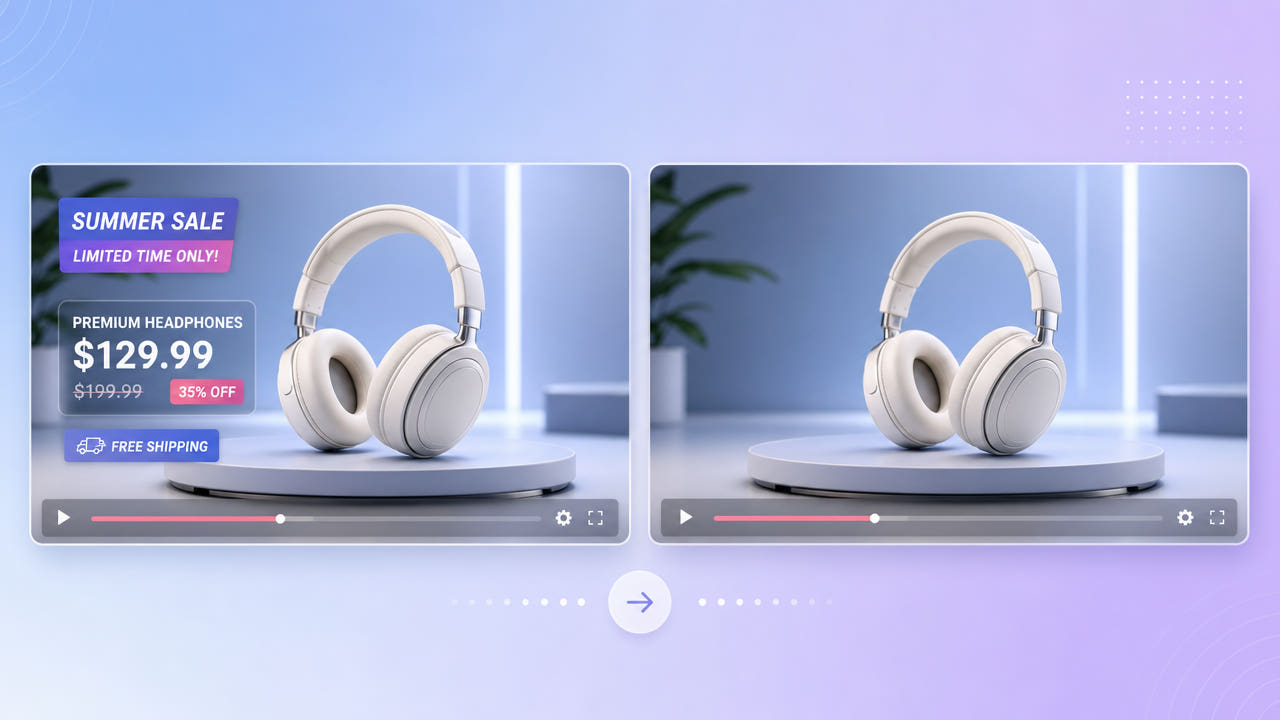
Why E-commerce Footage Needs Cleaning
Product videos are full of burned-in text: price tags, discount badges, shipping promos, and feature callouts. When a price changes or a promotion ends, that text makes the clip unusable until it is removed, and re-shooting the footage is expensive.
Stale Prices and Promos
Dropshippers and resellers often receive supplier videos with the original seller's text, currency, or store branding baked in. To list the same product under their own brand, they need a clean version free of the supplier's overlays.
Reusing Supplier Clips
Because these overlays sit over the product itself or a moving turntable shot, blurring leaves an obvious patch that undermines a polished store listing. AI inpainting rebuilds the product and background so the clip looks professionally shot.
Removing stale prices, promos, and supplier branding lets you reuse expensive product footage instead of re-shooting it.
Cleaning Product Videos with 550W Video Eraser
550W Video Eraser detects text regions and reconstructs what belongs behind them. Mark the price tag, badge, or callout, and the AI fills the area using surrounding frames so the product surface and backdrop stay consistent.
Mark Price and Promo Text
Product shots reward Protect mode because the reconstruction has to match reflective surfaces, textures, and rotating angles. The extra processing keeps fine detail intact where text sat over the product.
Protect Mode for Detail
The three-step workflow — select, mark, export — keeps it accessible for store owners who are not video editors. Batch processing handles up to 10 clips at once, which suits catalogs with many product videos to clean.
Protect mode reconstructs reflective product surfaces behind text, and batch processing cleans whole catalogs at once.
Building a Reusable Product Video Library
Keep a clean, text-free master of each product clip. From that master you can add channel-specific pricing or promos as soft overlays in your editor, then export tailored versions for Amazon, your storefront, and ads without baking text into the source again.
Clean Masters for Every Channel
A clean master also makes localization easy: add translated callouts per market instead of re-shooting. This mirrors the broader practice of removing text overlays to produce flexible, reusable footage.
Localize Without Re-Shooting
Tips for Professional Product Results
Start from the highest-resolution product video you have. Compressed marketplace downloads have artifacts around text that make a flawless erase harder, while a clean 1080p source gives the AI more to rebuild from.
Use High-Resolution Source
Promo text often has drop shadows, glows, or background banners. Extend your selection to cover those effects so no faint edge remains. Review the cleaned clip frame by frame where text overlapped the product before publishing the listing.
Cover Shadows and Glows
Work from a high-resolution source and include shadows and banners in your selection for a listing-ready clean clip.
Frequently Asked Questions
Can I remove an old price from a product video?
Yes. Mark the price text in 550W Video Eraser and the AI rebuilds the product and background behind it, so you can reuse the clip with updated pricing.
Can I clean supplier branding from a dropshipping video?
Yes. Mark the supplier's text or logo and the eraser reconstructs the area, giving you a neutral clip to brand as your own where you have rights to the footage.
Can I clean many product videos at once?
Yes. Batch processing handles up to 10 videos simultaneously, which is ideal for catalogs.
Will the product look natural after removal?
With Protect mode, the AI reconstructs textures and reflections behind the text so the product looks professionally shot at up to 1080p.
What formats and limits apply?
550W Video Eraser supports MP4 and MOV up to 1080p and 30 minutes per clip, covering typical product videos.