Repurpose TikTok Videos for YouTube Shorts
Why Repurpose TikTok Content for YouTube Shorts
TikTok and YouTube Shorts are the two dominant short-form video platforms, each with massive audiences that only partially overlap. Creators who publish exclusively on TikTok miss out on YouTube's 2 billion monthly active users, while those focused solely on YouTube miss TikTok's highly engaged younger demographic. Cross-platform content distribution is the most efficient strategy for maximizing reach without creating entirely new content for each platform.
YouTube Shorts has grown rapidly since its launch, offering creators access to YouTube's established monetization infrastructure, longer content shelf life, and integration with the broader YouTube ecosystem. Videos that perform well as Shorts can drive subscribers to your main channel, creating a growth flywheel that TikTok alone cannot replicate. Many successful creators now use TikTok as their content testing ground and YouTube Shorts as their long-term audience building platform.
Cross-posting TikTok content to YouTube Shorts doubles your audience reach without creating new content from scratch.
However, simply downloading a TikTok video and uploading it to YouTube Shorts creates problems. TikTok adds watermarks and burned-in captions to downloaded videos that immediately identify the content as cross-posted. YouTube's algorithm has been confirmed to deprioritize videos containing visible third-party watermarks, meaning your repurposed content will receive less algorithmic distribution if you skip the cleanup step.
What You Need to Remove Before Uploading to YouTube
A TikTok video downloaded through the app contains several platform-specific elements that need removal before the content is ready for YouTube Shorts.
TikTok Watermark
Every TikTok download includes a watermark showing your username and the TikTok logo, typically positioned in the corner of the frame. This watermark rotates between corners throughout the video. YouTube has explicitly stated that videos with visible third-party watermarks receive reduced distribution in the Shorts feed. Removing this watermark is the single most important step for YouTube Shorts performance.
Auto-Generated Captions
If you enabled TikTok's auto-caption feature, those captions are burned into the downloaded video file. TikTok's caption style with its distinctive font and positioning is immediately recognizable and signals cross-posted content. Remove these captions and let YouTube generate its own native captions, or add custom subtitles that match YouTube's visual language.
TikTok-Specific UI Elements
Some TikTok videos include platform-specific elements like duet layouts, green screen effects with TikTok branding, or stitch indicators. While not all of these can be removed, being aware of them helps you select which TikTok content is most suitable for cross-platform repurposing. Videos with minimal platform-specific elements transfer most cleanly to YouTube Shorts.
Remove TikTok watermarks and captions before uploading to YouTube Shorts to avoid algorithmic deprioritization.
Complete Workflow: TikTok to YouTube Shorts
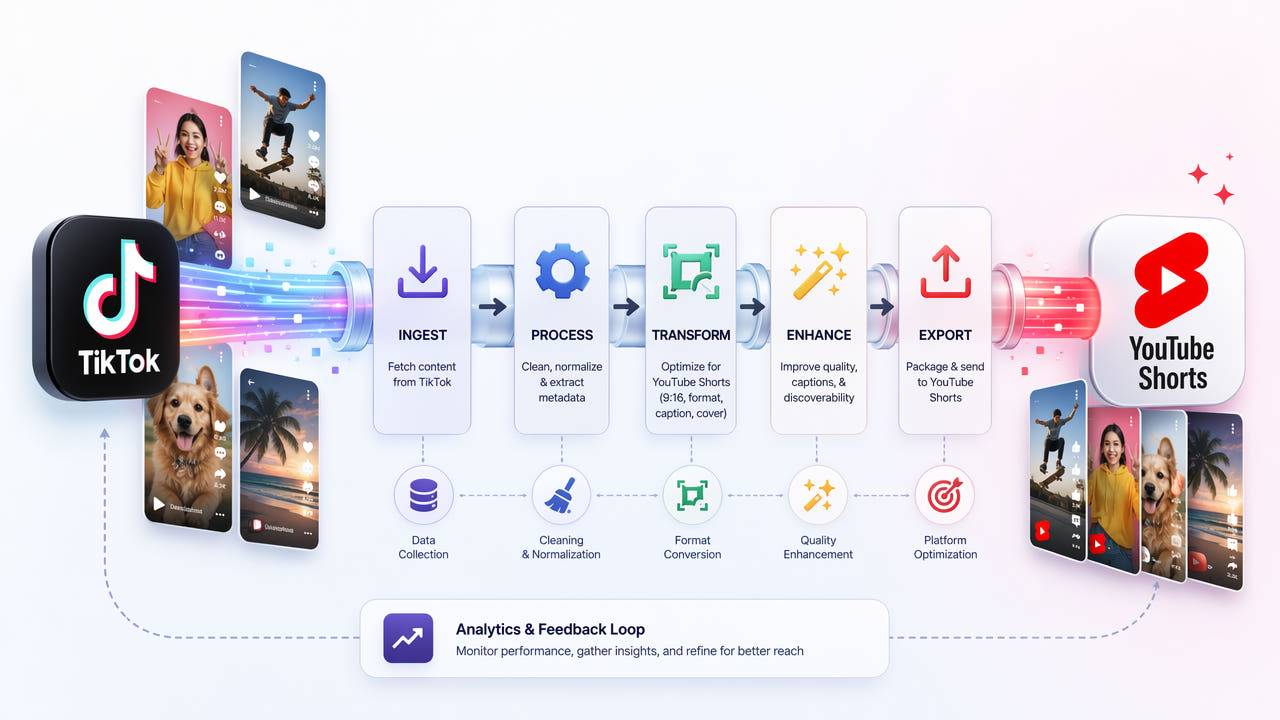
Follow this end-to-end workflow to transform your TikTok content into YouTube Shorts-ready videos that perform well with YouTube's algorithm.
Step 1: Select Content Worth Repurposing
Not every TikTok video is equally suitable for YouTube Shorts. Prioritize content that performed well on TikTok, as strong engagement signals often translate across platforms. Avoid videos that rely heavily on TikTok-specific trends, sounds, or references that YouTube audiences may not understand. Evergreen educational content, tutorials, and entertaining clips tend to perform best on both platforms.
Step 2: Download the TikTok Video
Save the video from TikTok to your device. For best quality, export from your TikTok drafts before publishing if possible, as this gives you a version without the watermark. If the video is already published, use TikTok's save feature which will include the watermark. You can also use third-party download tools that sometimes offer watermark-free downloads, though availability varies.
Step 3: Remove the TikTok Watermark
Upload your downloaded video to 550W Video Eraser. Select the watermark area, which typically appears in the corners of the frame. The AI will process each frame and remove the username and TikTok logo overlay. For detailed watermark removal instructions, see our dedicated guide on how to remove TikTok watermark for repurposing.
Step 4: Remove Burned-In Captions
If your TikTok video has auto-captions enabled, process the video again to remove the burned-in subtitle text. Select the caption region, typically in the center or lower portion of the frame, and run the AI removal. This gives you a completely clean video without any TikTok-specific text overlays. For more details on this step, see our guide on removing subtitles from TikTok videos.
Step 5: Verify Video Specifications
Before uploading to YouTube, verify your video meets Shorts requirements. The video must be 60 seconds or shorter in vertical format with a 9:16 aspect ratio. Resolution should be at least 1080x1920 pixels for best quality. If your TikTok video exceeds 60 seconds, trim it to the most engaging segment. YouTube Shorts does not support videos longer than 60 seconds.
Step 6: Upload and Optimize for YouTube
Upload the clean video to YouTube as a Short. Add a compelling title with relevant keywords, a description that provides context, and hashtags including #Shorts. Enable YouTube's auto-generated captions for accessibility. Create or select an eye-catching thumbnail if your Short is longer than a few seconds. Schedule the upload for a time when your YouTube audience is most active.
Optimizing Repurposed Content for YouTube's Algorithm
Simply removing watermarks and uploading is not enough to maximize performance on YouTube Shorts. These optimization strategies help your repurposed content compete with native YouTube content.
Customize Titles and Descriptions
Do not copy your TikTok caption directly as your YouTube title. YouTube's search and recommendation algorithms weight titles and descriptions heavily. Write a YouTube-optimized title that includes relevant search keywords and clearly communicates the video's value proposition. Your description should include additional context, relevant links, and a call-to-action for subscribing.
Add YouTube-Native Captions
After removing TikTok's burned-in captions, enable YouTube's auto-generated captions or upload custom subtitle files. YouTube's native captions are indexed for search, improving your video's discoverability. They also match YouTube's visual style, making your content feel native to the platform rather than cross-posted.
Timing Your Cross-Posts
Avoid uploading to YouTube Shorts at the same time you post on TikTok. Stagger your posts by 24 to 72 hours. This gives each platform's algorithm time to evaluate your content independently and prevents any potential duplicate content issues. Some creators post on TikTok first to test engagement, then repurpose their best-performing content to YouTube Shorts a few days later.
Leverage YouTube's Longer Shelf Life
Unlike TikTok where content peaks within hours, YouTube Shorts can continue gaining views for weeks or months after posting. Optimize your titles and descriptions for search terms that people will continue searching for over time. Evergreen content that answers common questions performs particularly well on YouTube's longer content lifecycle.
Common Mistakes When Repurposing TikTok for YouTube
Avoid these frequent errors that reduce the performance of repurposed content on YouTube Shorts.
Leaving the TikTok Watermark Visible
This is the most common and most damaging mistake. YouTube has confirmed that videos with visible third-party watermarks receive reduced distribution. Even a small, partially transparent watermark can trigger this deprioritization. Always remove the watermark completely before uploading.
Using TikTok-Specific Audio
Some TikTok sounds are licensed exclusively for TikTok and may trigger copyright claims on YouTube. Before repurposing, verify that any music or sound effects in your video are either original, royalty-free, or licensed for YouTube use. Copyright strikes on YouTube have more severe consequences than on TikTok, potentially affecting your entire channel.
Ignoring Aspect Ratio Requirements
While both platforms use vertical video, some TikTok content may have non-standard framing due to effects, duets, or green screen features. Ensure your final video is clean 9:16 vertical format without any black bars, split screens, or unusual framing that could confuse YouTube's Shorts detection system.
Cross-Posting Everything Indiscriminately
Not all TikTok content works on YouTube. Trend-dependent content, videos relying on TikTok-specific sounds, and content referencing TikTok culture may not resonate with YouTube audiences. Be selective about which content you repurpose, focusing on universally appealing videos that work regardless of platform context.
Tools for Efficient Cross-Platform Repurposing
Building an efficient repurposing workflow requires the right combination of tools for different stages of the process.
Watermark and Subtitle Removal
AI-powered tools like 550W Video Eraser handle the most critical step of removing TikTok branding elements. These tools process videos quickly and produce clean results suitable for professional cross-platform distribution. For creators processing multiple videos daily, batch processing capabilities save significant time compared to handling each video individually.
Video Editing and Trimming
Basic video editors like CapCut, InShot, or Adobe Premiere Rush can trim videos to meet YouTube's 60-second limit and make minor adjustments. These tools also allow you to add YouTube-optimized text overlays, transitions, or end screens that encourage subscriptions.
Scheduling and Analytics
Tools like TubeBuddy, vidIQ, or YouTube Studio's built-in scheduler help you time your uploads for maximum impact. Analytics tools track which repurposed content performs best on YouTube, helping you refine your selection criteria for future cross-posting decisions.
The most efficient workflow combines these tools into a streamlined pipeline: download from TikTok, clean with AI tools, optimize metadata, and schedule for upload. Creators who systematize this process can repurpose content across platforms in minutes rather than hours.
Frequently Asked Questions
Can I post TikTok videos directly to YouTube Shorts?
You can, but videos with TikTok watermarks get deprioritized by YouTube's algorithm. Remove watermarks and captions first for significantly better performance.
Does YouTube penalize repurposed TikTok content?
YouTube deprioritizes videos with visible third-party watermarks. Clean videos without TikTok branding receive normal algorithmic treatment on the Shorts shelf.
What is the maximum length for YouTube Shorts?
YouTube Shorts can be up to 60 seconds long. TikTok videos up to 60 seconds transfer directly while longer ones need trimming before upload.
Should I add new captions for YouTube Shorts?
Yes. After removing TikTok captions, enable YouTube's auto-captions or add custom subtitles matching YouTube's native style for better engagement and accessibility.