ลบภาพซ้อน Twitch จากบันทึกที่ได้รับอนุญาต
อัปเดต · ขั้นตอนการใช้ผลิตภัณฑ์ได้รับการตรวจสอบโดย 550W AI Labs
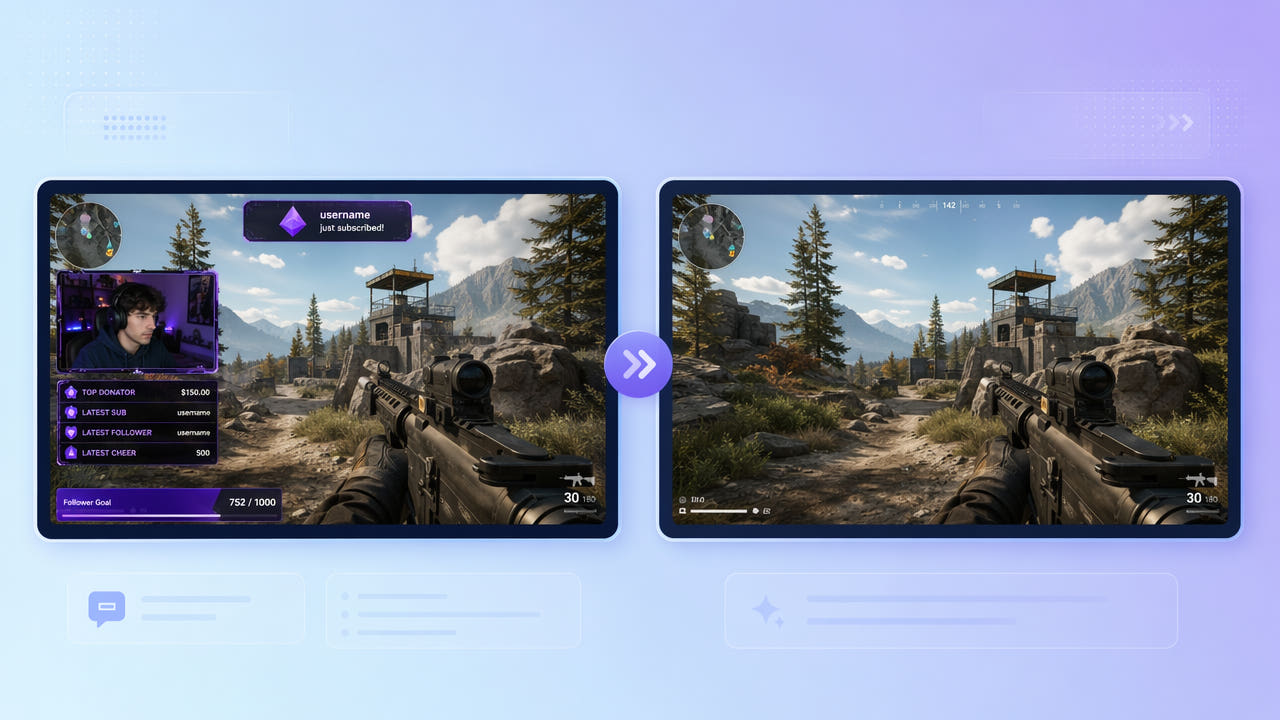
ภาพซ้อนในบันทึกสตรีม
กล้อง แชต และการแจ้งเตือนอาจฝังในภาพ ให้ค้นหาบันทึกเกมแยกหรือชั้นที่แก้ไขได้ก่อน
กรอบกล้องและแผง
กราฟิกอาจรบกวนช่วงเด่นของสตรีมที่เป็นของคุณหรือได้รับอนุญาต การลบไม่ได้ให้สิทธิ์ในสตรีมผู้อื่นหรือภาพเกม
การแจ้งเตือนและกล่องแชต
แผงและการแจ้งเตือนสั้นปรากฏต่างตำแหน่งและเวลา ตรวจเส้นเวลาทั้งหมดโดยไม่ถือว่าทุกข้อความถูกตรวจพบ
ใช้บันทึกแยกและตรวจช่วงเวลาภาพซ้อน
แก้ภาพเกมด้วย 550W Video Eraser
อัปโหลดคลิปที่เข้าเงื่อนไขและเลือกแผง Standard ประมวลผลด้านในพื้นที่เลือก AI ประเมินภาพเกมที่ถูกบังจากรอบข้าง ไม่ได้กู้พิกเซลต้นฉบับ
เลือกแผงคงที่
ตรวจตำแหน่งและเวลาของการแจ้งเตือน พื้นที่คงที่อาจพลาดการเคลื่อนไหวหรือครอบภาพเกมหลังข้อความหาย Protect รักษาด้านในและประมวลผลด้านนอก ไม่ใช่โหมดคุณภาพสูงกว่า
ตรวจการแจ้งเตือนเคลื่อนไหว
ก่อนประมวลผล ให้ตรวจขีดจำกัดงาน ตัวเลือกที่มี และเงื่อนไขอัปโหลดในหน้าจอปัจจุบัน ขั้นตอนวิดีโอรองรับสูงสุด 1080p และ 30 นาที ตรวจขนาดไฟล์ที่หน้าอัปโหลด เวลาในการประมวลผลขึ้นกับเนื้อหา พื้นที่เลือก และสถานะบริการ
ตรวจรายละเอียดตลอดไฟล์ส่งออก
ทำช่วงเด่นจากสตรีม
แหล่งวิดีโอได้รับอนุญาตที่ไม่มีภาพซ้อนช่วยทำช่วงเด่น หากมีบันทึกเกมแยกให้ใช้แทนการประเมินภาพหลังกล้อง
แก้เฉพาะสตรีมของคุณหรือที่ได้รับสิทธิ์ ตรวจเงื่อนไขแพลตฟอร์มและสิทธิ์เกมสำหรับการเผยแพร่ที่วางแผนไว้
ตรวจภาพที่สร้างทดแทน
แผงใหญ่เหนือเกมที่เคลื่อนไหวมากสร้างทดแทนยาก ตรวจการเคลื่อนไหวเร็ว ส่วนติดต่อเกม และการเปลี่ยนฉาก ไม่รับประกันผลที่แนบเนียน
พื้นที่ภาพเคลื่อนไหวน้อย
รวมขอบ เงา และแสงโดยไม่เลือกภาพเกมเกินจำเป็น หากตำแหน่งเปลี่ยนให้ตรวจแต่ละช่วงและไฟล์ส่งออกทั้งหมด
รวมกรอบทั้งหมด
ตรวจการเคลื่อนไหวและขอบภาพซ้อนทั้งหมด
คำถามที่พบบ่อย
ลบกรอบกล้องได้ไหม
เลือกกราฟิกด้วย Standard ในวิดีโอที่มีสิทธิ์แก้ไข ภาพเกมที่ถูกบังถูกประเมินขึ้น ต้องตรวจผลทั้งหมด
ลบการแจ้งเตือนชั่วคราวได้ไหม
ตรวจตำแหน่งและเวลาของแต่ละข้อความ ใช้ตัวควบคุมปัจจุบันโดยไม่พึ่งการตรวจจับหรือติดตามอัตโนมัติ
ภาพเกมจะดูธรรมชาติไหม
ไม่รับประกัน โดยเฉพาะการเคลื่อนไหวเร็ว ตรวจรายละเอียดและไฟล์ดาวน์โหลดทั้งหมด
ประมวลผล VOD ทั้งหมดได้ไหม
คลิปที่เข้าเงื่อนไขสูงสุด 1080p และ 30 นาที แบ่งบันทึกยาวที่ได้รับอนุญาตและตรวจขีดจำกัดงานกับไฟล์ปัจจุบัน
ต้องมีทักษะตัดต่อไหม
เบราว์เซอร์ให้คุณอัปโหลด เลือก และตรวจผล แต่การเลือกแม่นยำและการตรวจภาพสุดท้ายยังต้องใส่ใจ