Content Repurposing Workflow for Video Creators
Updated · Product workflow reviewed by 550W AI Labs
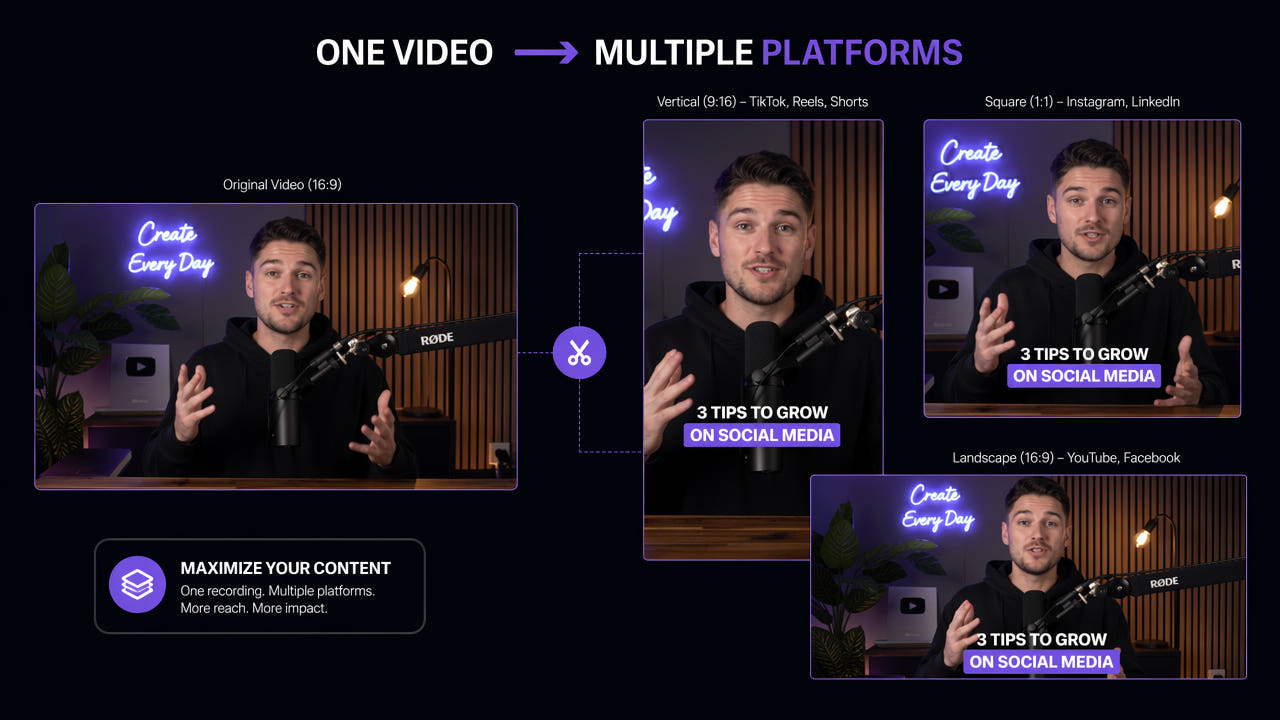
Plan Reuse from the Source File
A source video can support several edits when its footage, music, graphics, and captions may be reused. Before making platform variants, record who owns each asset and which permissions or attribution obligations apply.
Different destinations can require different aspect ratios, caption conventions, accessibility choices, and disclosure. Verify the current publishing requirements for each destination rather than assuming a universal template.
A reusable master project is often easier to adapt than a downloaded copy with baked-in text. Keep the original layers and clean exports when available so you can change captions or framing without rebuilding hidden pixels.
Start with rights and editable source assets before planning destination-specific versions.
Choose Tools by the Editing Job
A repurposing workflow may involve cutting, reframing, captioning, visual cleanup, and scheduling. Choose tools for the changes your own footage actually needs and verify current capabilities before subscribing.
Visible Text and Watermark Editing
If an authorized source contains visible text that cannot be edited in the project, 550W Video Eraser can estimate replacement imagery in a selected area. The hidden original pixels are not recovered; review the whole export and retain required attribution or disclosure. Standard processes the selected interior; Protect preserves that interior and processes the exterior. Protect is a different selection behavior, not a higher-quality mode.
Resizing and Reframing
Check whether the text is an editable subtitle track, a removable project layer, or pixels burned into the picture. Only the last case needs visual reconstruction, and every result still requires review.
Clip Selection
A framing tool can make a vertical or square version from a wider source. Check faces, products, on-screen text, and action across the full timeline; automatic subject tracking, where available, still needs human review.
Caption and Subtitle Creation
Clip selection tools can help find candidate moments in long recordings. Check the context around each cut so that short extracts do not change the meaning of a statement or omit necessary explanation.
Caption tools can draft a transcript or translation, but names, timing, accessibility, and language nuance need correction. If text is an editable track, update that track instead of reconstructing the picture.
Match each tool to a specific authorized edit and review automated suggestions before publishing.
A Practical Repurposing Workflow
A repeatable workflow uses a source checklist, a destination brief, and a final review for each export. The number of variants depends on the content and available rights. Check ownership and permission for the video, music, graphics, people, and embedded text. Identify any editable layers or original exports, then note the moments that can stand alone without losing context.
Step 1: Audit Rights and Source
Remove or replace only overlays you are authorized to change. Prefer editing the source project or caption track; for burned-in text, test a short authorized segment and inspect reconstructed frames before editing the full clip.
Step 2: Resolve Source Overlays
Keep a record of which overlays were removed, why the edit was authorized, and which required credits or notices remain in the destination version.
Step 3: Reframe for Each Destination
Create the required aspect ratio for each destination. Recheck subjects, logos, subtitles, and important action through the full timeline; a crop that works in one frame may fail later.
Step 4: Add Destination Captions and Graphics
Add captions, attribution, disclosures, and graphics appropriate to the destination. Review translations and caption timing with a person who understands the target language and content.
Step 5: Review and Publish
Compare each exported file against its brief and source, including picture, sound, encoding, and required attribution. Publish only after checking current platform rules and your rights, then record the version and destination.
Compare Tool Roles Without Fixed Rankings
Product features and prices change. Compare current official documentation and a representative authorized file for each workflow; no single product is best at every stage.
550W Video Eraser — Selected Visual Cleanup
550W Video Eraser provides browser video processing for eligible MP4 and MOV files up to 1080p and 30 minutes. File-size conditions appear in the current upload interface. Processing time varies with footage, selected area, and service status; inspect each task output.
Clip Extraction Tools
A clip extraction product may help generate candidate short segments. Verify how it chooses boundaries, handles speaker context, and exports files before relying on it for publication.
Publishing and Scheduling Tools
A scheduling service may help organize distribution. Check its current destination support, account permissions, approval controls, and failure handling in official documentation.
Design and Caption Tools
Design and caption editors can help create branded graphics or subtitle tracks. Compare actual export controls, collaboration needs, accessibility, and current fees rather than assuming a named provider supports a particular feature.
Improve the Review Process
Once the basic workflow is reliable, make a checklist for each content type and destination. Reuse templates where they save work, but still review every version.
Break Content into Useful Pieces
A recorded discussion might yield a short clip, a quote graphic, and a written summary. Choose only pieces that remain accurate with enough context; no fixed number of assets is guaranteed.
Adapt to Each Destination
A destination-specific edit may change framing, pace, title, captions, or call to action. Check the platform’s current rules and ensure each variant still represents the source fairly.
Refresh Reusable Material
Older content can be updated when the rights remain valid. Review dated claims, offers, logos, and source permissions before publishing a new version; do not assume removing an overlay makes the material current.
Plan Multilingual Versions
For another language, prepare a reviewed translation or voiceover and check whether existing captions are separate tracks or burned into the image. Editing the track is preferable when available; visual reconstruction needs close review.
Measure Effort and Results
Measure whether each variant justifies its editing, review, and publishing costs. Results differ by topic, audience, platform, and season.
Time and Review Effort
Record preparation time, tool charges, translation effort, and human review per export. Compare those costs with making a new piece; avoid using fixed percentage targets that may not fit your workflow.
Incremental Reach
Track impressions and unique reach for each destination while accounting for overlapping audiences. Compare against your own prior posts rather than assuming a fixed reach multiplier.
Quality of Engagement
Look at meaningful engagement such as completion, qualified replies, saves, leads, or conversions. Weak results may reflect the topic, framing, captions, or timing; inspect the actual variant before changing the whole process.
Frequently asked questions
What are content repurposing tools?
They help adapt existing authorized content for another format or destination. The work may include editing, reframing, captions, translation, visual cleanup, or scheduling.
How many destinations can one video serve?
There is no fixed number. It depends on the source rights, useful moments, destination requirements, and the effort needed to review each output.
Must I remove a watermark before reuse?
Not always. Keep required attribution and disclosures. If an authorized edit needs visual cleanup, prefer an editable source layer; reconstruction of burned-in text may leave artifacts.
Can tools help with multiple files?
Some products offer multi-file workflows, but controls and limits differ. In 550W, eligible videos are independent tasks, and any reused selection must be verified for each file.